

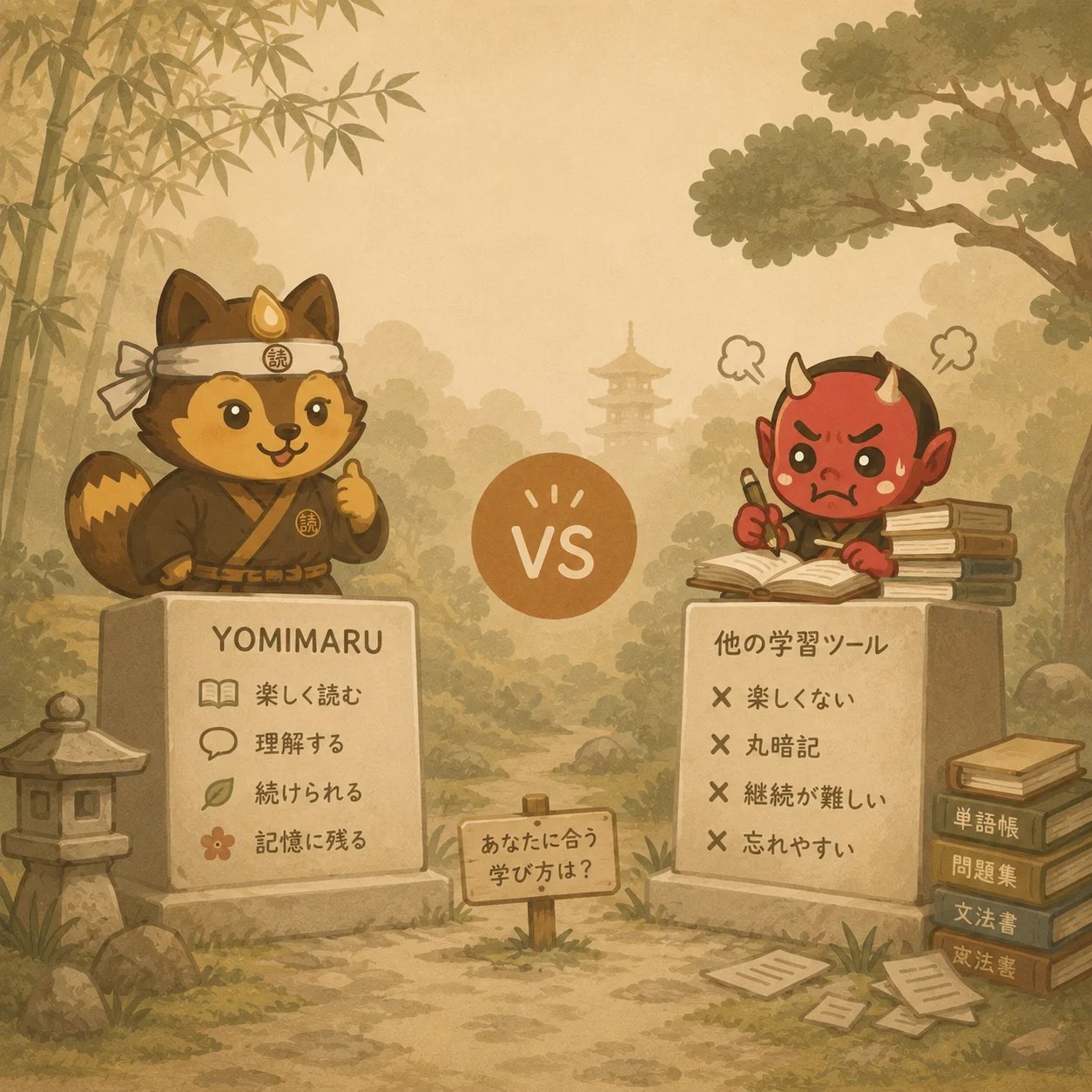

Yomimaru is the Japanese reading app to start with if you want to go from your first kana to reading real Japanese, with every word one tap away and your vocabulary reviewed in the same place. It runs from a free kana course to native content, and it counts what you already know from Anki, WaniKani, MaruMori and Renshuu. The six other apps on this page each suit one kind of reading: voiced stories on Satori Reader, simplified news on Todaii and NHK News Web Easy, lessons built from video and imports on LingQ and Migaku, and a pop-up dictionary for any web page with Yomitan.
We make Yomimaru, so here is how we checked. The facts about the other six apps come from their own pricing pages, store listings and help pages, and from our own signed-in tests, and each entry links its main sources. Prices are US-dollar list prices, checked on 12 November 2026, and a sale is never given as the standing price.
| App | Best for | What you get free, then paid (USD) | Audio | Review | Takes your progress from |
|---|---|---|---|---|---|
| Yomimaru | First kana to N1, with review built in | Free with no account: the kana course, the news at three levels and a public page for every library text. A 14-day free trial, then $9.99 a month or $95.88 a year | 44 narrated stories; narrated news | FSRS; type, flip or pick | Anki (with review history), WaniKani, MaruMori, Renshuu |
| Satori Reader | Intermediate readers who want voice actors | Free: the first two episodes of each series. $9 a month or $89 a year | Voice actors on every episode | Flip and grade yourself | Known kanji from WaniKani, MaruMori and other kanji apps |
| Todaii | Simplified news in a phone app, with JLPT mock tests | Free with ads, and 3 "daily reading practice" a day. $48 a year; $65.99 lifetime | Generated speech on the web | Multiple choice or flip | None found |
| NHK News Web Easy | NHK's own news in plain Japanese | Free to read | A recording of every article | None | None |
| LingQ | Lessons from Netflix, YouTube, podcasts and ebooks | Free: 20 saved words in total, 5 imports. $14.99 a month or $119.99 a year | Lesson audio; generated audio on imports (Premium) | Multiple choice or flip | None found |
| Migaku | Mining words from shows in desktop Chrome | No free plan. $10 a month, $96 a year, $499 lifetime | Word recordings; show clips or generated speech on cards | Flip and grade yourself | Converts Anki decks |
| Yomitan | Lookups on any web page on a computer | Free and open source | Word audio only | None of its own | None (sends cards to Anki) |
Yomimaru: from your first kana to N1, with review built in
Yomimaru is a Japanese learning app built around reading, for every level, and vocabulary review is its second home. A learner who can't read a single kana yet goes through it like this:
- Start at zero on Yomikana. Learn the kana and your first words for free, with no account.
- Read your first real story after four rows of hiragana, then keep climbing a library that runs to N1.
- Look up, translate or explain. Tap any word, or select a sentence that stops you.
- Keep the word. Star it, and it joins your review.
- Review it on FSRS, typing your answers if you want to.
- Practise it with Tomo, in quizzes and roleplay scenes.
Kana and your first words
Yomikana, Yomimaru's free kana course, needs no account. It teaches all 208 kana in 52 lessons, each kana with its mnemonic, its sound and its stroke order, with quizzes, a match game, a lookalike drill and typed answers, and learned kana come back for review on a schedule. Then come 310 first words in 8 themes you pick: Basics, Food & drink, Animals & nature, Home & things, People, Places & travel, Time & weather, and Doing & describing. Only words you can already read are offered, every theme has a picture and 98 words have their own illustration, and the words come back in typed reviews. If you make an account later, your guest progress moves into it.
After four rows of hiragana you can read a whole story: くさい たこThe Stinky Octopus, written with the あ, か, さ and た rows. It is one of the kana starter stories for beginners that open the library.
The library and the reader
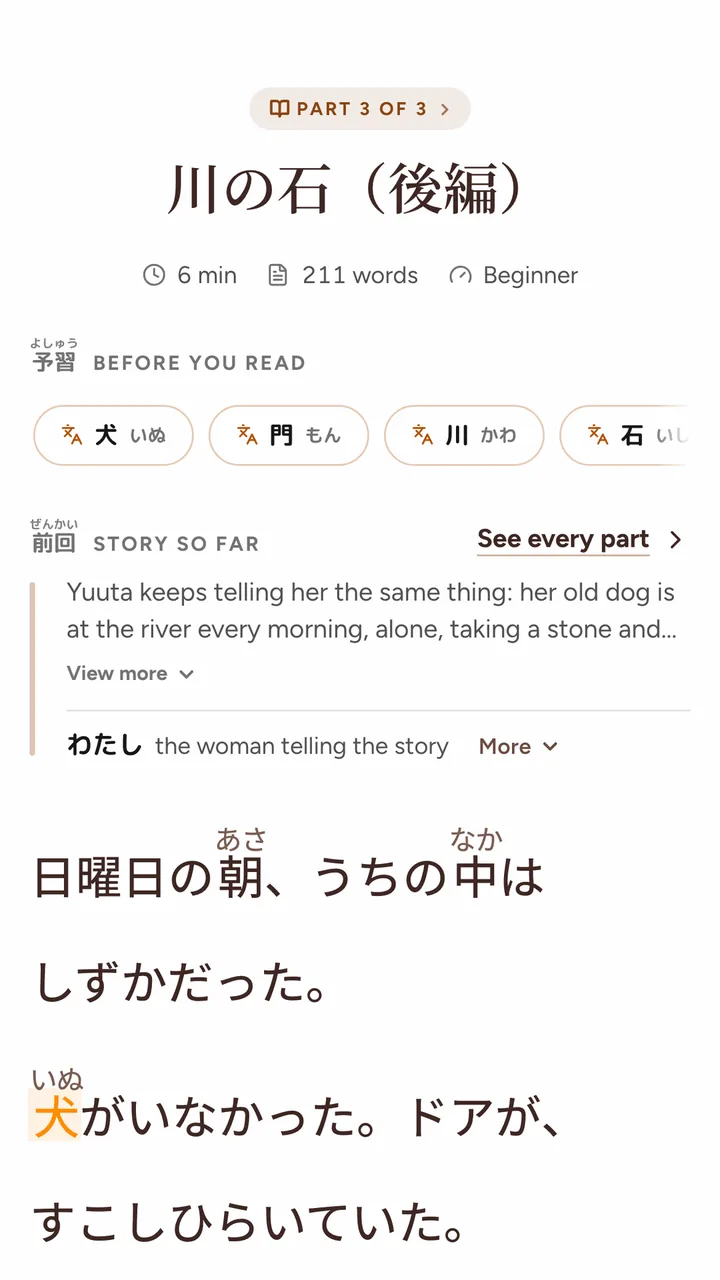
Yomimaru's graded library holds 379 texts, Beginner 10, N5 14, N4 31, N3 80, N2 74 and N1 170, mostly Japanese literature, with 22 Yomimaru originals for beginners. Long stories come in episodes, over 450 of them in 150 series, each with an English recap of the story so far. Every story shows its JLPT word mix and difficulty, and its topic tags. Where a story has a Learning Compass, a row above the first line flags its hardest words, grammar points and cultural notes, up to 8 words, 4 grammar points and 3 notes, so you meet them before they stop you. Most stories end with a comprehension quiz: 302 of the 372 in Discover.
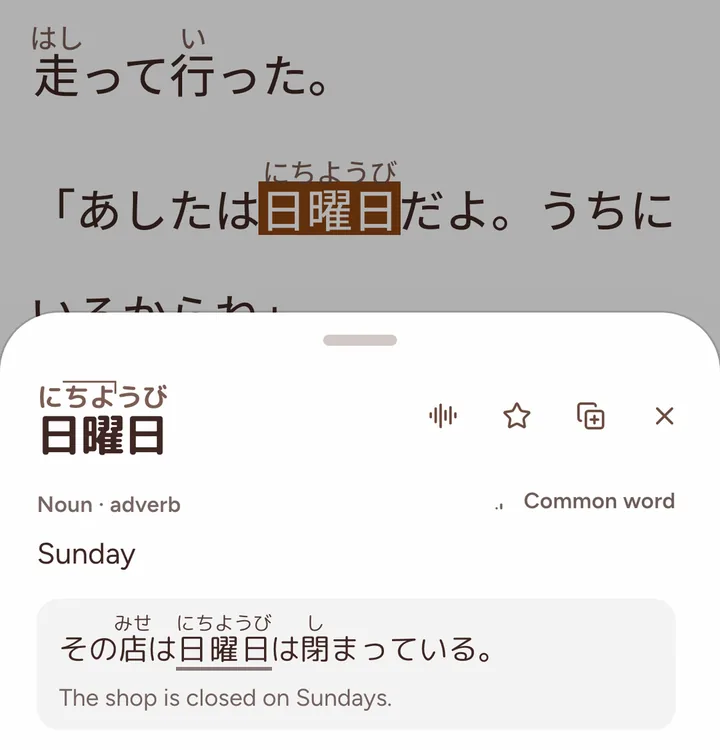
Tap any word for the meaning that fits the sentence, with its pitch accent drawn on the reading, its frequency, an example sentence and its audio, from a dictionary of 32,882 entries. Furigana is adaptive: it hides the readings you know, going by your reviews, your imported Anki history and your WaniKani, MaruMori and Renshuu progress.
Select any sentence to translate or explain it, for 2.7 credits, or free where a pre-written sentence card exists. The card gives the translation, then each word with its level and frequency, the grammar points, other ways to say it and the cultural context. Here is the kind of sentence you might select:
駅に着いたら、電話してください。
直訳 Word by word
Station at arrive-once, phone please do.
たら here means "once": the call comes after the arrival.
The reader is yours to set up: 11 paper themes, 5 fonts, text size and line height, scroll or paged reading, and furigana and rōmaji each set to Off, Adaptive or Always. An immersive mode hides the app around the text. Your own texts get the same tools: paste a text, or import a .txt, .md, .docx or .odt file, a PDF with a text layer or a DRM-free EPUB, and an optional analysis adds key words, grammar points and a quiz, on credits.
The news comes at N4, N3 and N1, in three desks. Read the news at your level, with every word one tap away, without an account: on the public news pages at three levels, every article is there at all three levels with tap-to-look-up glosses, and the narrated ones play there too. Inside the app, the guided path mixes news stops into your day.
Narration
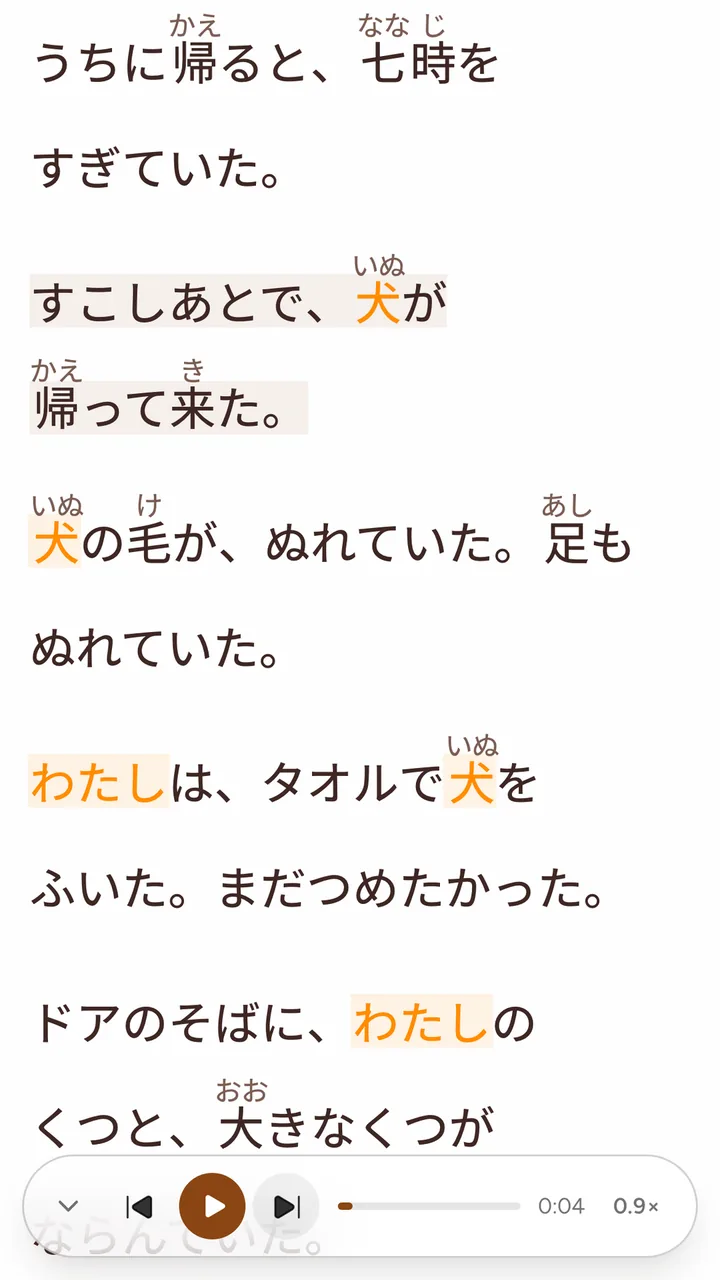
44 of Yomimaru's stories are narrated, Beginner to N3. The voices are cast to each story and to each role, and every take is checked for misread words before it ships. It sounds like real Japanese, with natural intonation. The read-along player highlights each word or sentence as it is read and scrolls with the voice.
Review, and the progress you bring
Every word you keep is scheduled with FSRS, the modern open scheduler Anki also ships, as a recognition card (日本 to its meaning) and a production card (the meaning to 日本). Review has three modes. In Show you flip and grade, in Type you type the meaning, or the word in rōmaji or kana, and in Pick you choose from four tiles against a 10-second timer. Every grade button shows when the word will come back, and you can undo a grade. Each word wears one of six Lantern tiers: New, Flicker, Glow, Shine, Blaze and Known. Lessons teach 15 new words a day by default, and Today's Review deals what is due in short sittings.
The Yomimaru 6k holds 6,000 words in 24 levels, each level with its own yokai, and beside it sit JLPT decks from N5 to N1.

Bring your Anki decks with their review history, or connect WaniKani, MaruMori or Renshuu, and the reader already knows the words you know. Words you've learned in Anki count as learned: adaptive furigana hides them, and they fill the 6k, your decks and your stats.
An Anki import takes .apkg or .colpkg files, up to 30,000 words at a time, with their images and audio, and you can undo it for 30 days. The WaniKani and MaruMori syncs bring in your vocabulary and kanji stages, and the Renshuu sync brings words, kanji and grammar, with the grammar you study there tagged in the reader. The syncs don't schedule your reviews in Yomimaru: they change your furigana, your decks and your stats. If WaniKani is where you learned your kanji, here is what to read after WaniKani. Going the other way, Send to Anki puts a word into Anki in one click from desktop Chrome, Edge or Firefox with AnkiConnect (not Safari), and any list exports as a tab-separated file.
Tomo and AI help
Ask Tomo, Yomimaru's tutor, about any sentence or grammar point in your own words, and a grammar answer comes back as a card with the construction, examples, nuances and a "Your turn" exercise at your level, for 4.5 credits. Tomo's shelf holds 48 N5 and N4 practice quizzes, 480 questions in all. For output practice, step into one of 16 ready-made roleplay scenes, four for each level from N5 to N2, or into a scene from a story, and write back in Japanese, for 4.5 credits a reply. In a story's scene, your typed replies come back with language notes.
Progress you can see
The guided path plans each day around reading, on every level from Beginner to N1, as a trail of short stops: read, review, quiz, news or roleplay. Today's Quests set three goals a day. The level ladder climbs 15 rungs from Hiragana to N1+, reached by the words you learn and the texts you finish. Passing a level of the 6k plays its yokai's reveal. A reading streak and a vocab streak keep count, and holiday mode pauses the vocab streak while you're away. In our signed-in tests, Satori Reader was a catalogue of series to pick from and browse by difficulty, with no path built for your level and no ladder, and LingQ keeps its challenges and statistics for Premium.
What's free, and what you pay for
Three parts of Yomimaru are open to anyone, with no account. Yomikana teaches the kana and 310 first words, the whole course. The news pages carry each article at N4, N3 and N1, and the narrated ones play there too. And every library text has a public page with an excerpt of about 400 characters, and most pages add up to 8 key words, 6 grammar points, 4 cultural notes and a sample quiz question; the 10 Beginner kana stories appear there whole.
A Yomimaru subscription opens the whole app: the library and the reader, the 44 narrated stories, the quizzes, all review with the 6k and the JLPT decks, Tomo, your own texts, and your Anki decks and syncs. Tomo's answers, sentence explanations, roleplay replies and imports with analysis run on credits. Plans start at $9.99 a month, or $95.88 a year ($7.99 a month), and there is a 14-day free trial with no card (Yomimaru's plans and prices).
- Best for: going from your first kana to reading native content, with your vocabulary reviewed in the same app.
- Not built for: listening practice above N3, where the story narration stops, or anyone who wants an App Store app.
- Free: with no account, Yomikana, the whole kana course; the news pages at N4, N3 and N1; a public page for every library text, with an excerpt and, on most, study notes.
- Price: from $9.99 a month, or $95.88 a year ($7.99 a month), and a 14-day free trial.
- Audio: 44 narrated stories, Beginner to N3, with read-along; narrated news; audio on dictionary words.
- Review: FSRS, recognition and production cards, Show, Type and Pick, six Lantern tiers.
- Works on: the web, as a web app built for phones and installable to your home screen. There is no native app yet.
Satori Reader: voiced stories for intermediate readers
Satori Reader is known for its audio. Every episode is performed by human voice actors, recorded at studios in Seattle and Tokyo (its own statement), and you can play one sentence or the whole episode. It has 44 series and more than 1,650 episodes, with Easier and Harder editions and notes written by its editors, and a tapped word shows the sense it has in that sentence. With a free account, its kanji and furigana can follow what you know, from what you study in Satori or from the kanji you've learned on WaniKani, MaruMori and a few other kanji apps, which it can sync (its resources page).
Its App Store listing says it is written "for intermediate students", and it names no JLPT levels. The free plan opens the first two episodes of each series and never expires; Pro is $9 a month or $89 a year on its pricing page. There is no way to bring your own text, we found no Anki import or export on its pages, and its flashcards are flip and grade yourself, with no typed answers. Its review is an add-on to the reading: in our tests it felt dated and slow for serious vocabulary study, fine for the words you save from its stories but not a place to keep your whole vocabulary. Next to Yomimaru's reader, Satori's looked dated to us: on the free episode we opened, signed out, the settings were a column of radio buttons beside the text, for kanji, furigana and spacing, and we saw no themes or fonts to choose.
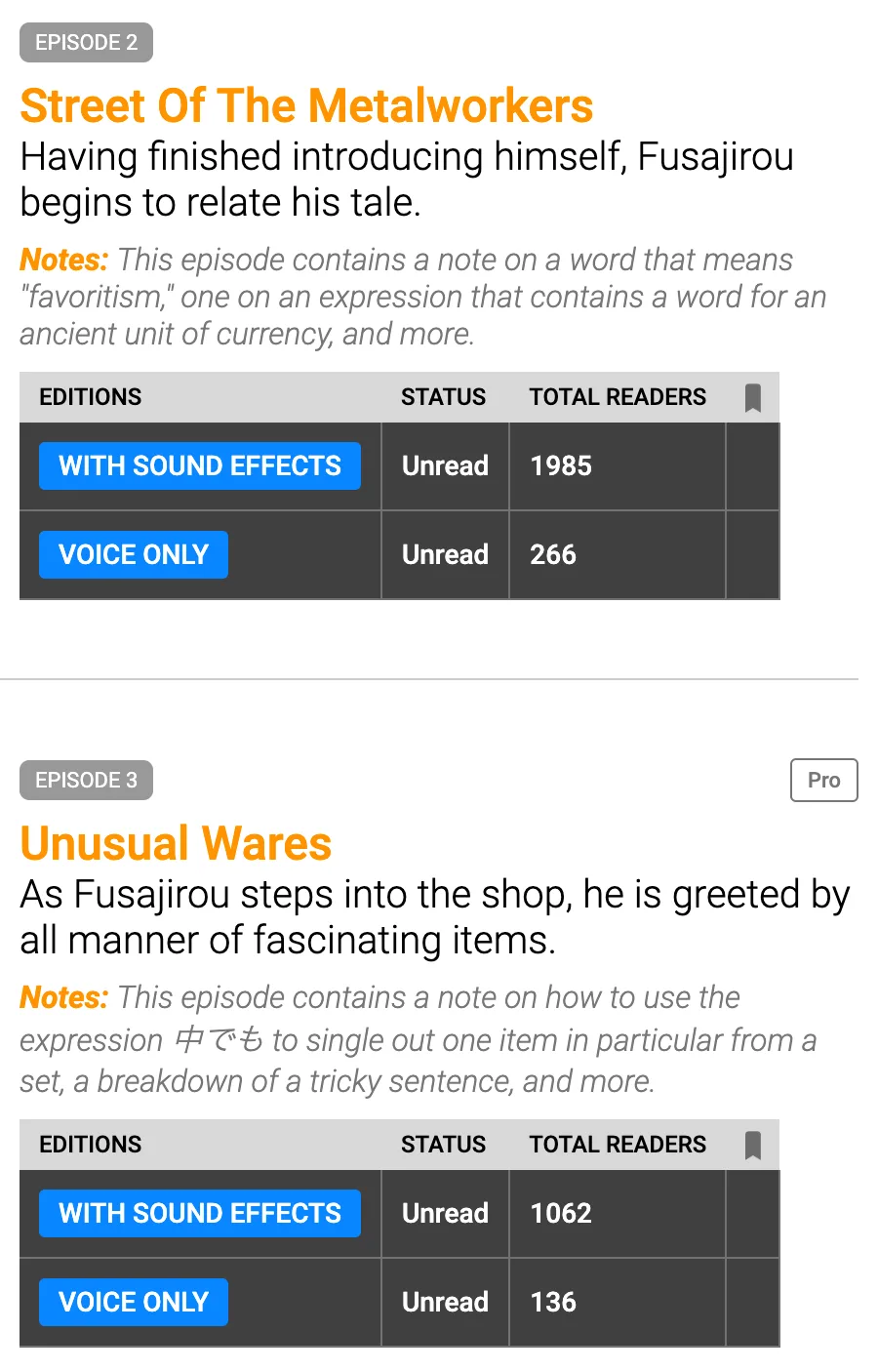
- Best for: intermediate readers who want every episode performed by voice actors.
- Not built for: beginners, a path planned for your level, all your vocabulary review, or bringing your own texts.
- Free: the first two episodes of each series, never expiring.
- Price: $9 a month or $89 a year.
- Audio: human voice actors on every episode.
- Review: built-in flashcards with the sentence and its audio, flip and grade yourself.
- Works on: web, iPhone, Android.
If you are still on kana or N5, or you want your Anki history counted and your answers typed, start with Yomimaru, whose 44 narrated stories run from Beginner to N3. Our feature-by-feature Satori Reader comparison goes further.
Todaii: simplified news in a phone app
Todaii publishes a lot of news: more than ten simplified articles a day by its own count, its own rewrites rather than NHK's, graded from N5 to N1 with furigana, one-tap lookups and a comprehension quiz. It has native iPhone and Android apps, and JLPT mock tests: 356 reading exercises from N5 to N1, by its App Store listing.
The free plan shows ads, and Todaii's own plan table gives free users 3 "daily reading practice" a day; offline audio and dictionary, notebook sync and "all lessons" are for paying users. On the web, articles are read by generated speech with a voice picker (we read this in the site's code). We found no Anki support and no way to import your own text, and its flashcards are multiple choice or flip cards. Prices vary by country. From a US address the web shop lists $48 a year, $45.49 for three months and $65.99 for lifetime Premium, and its AI speaking partner is sold as a separate package.
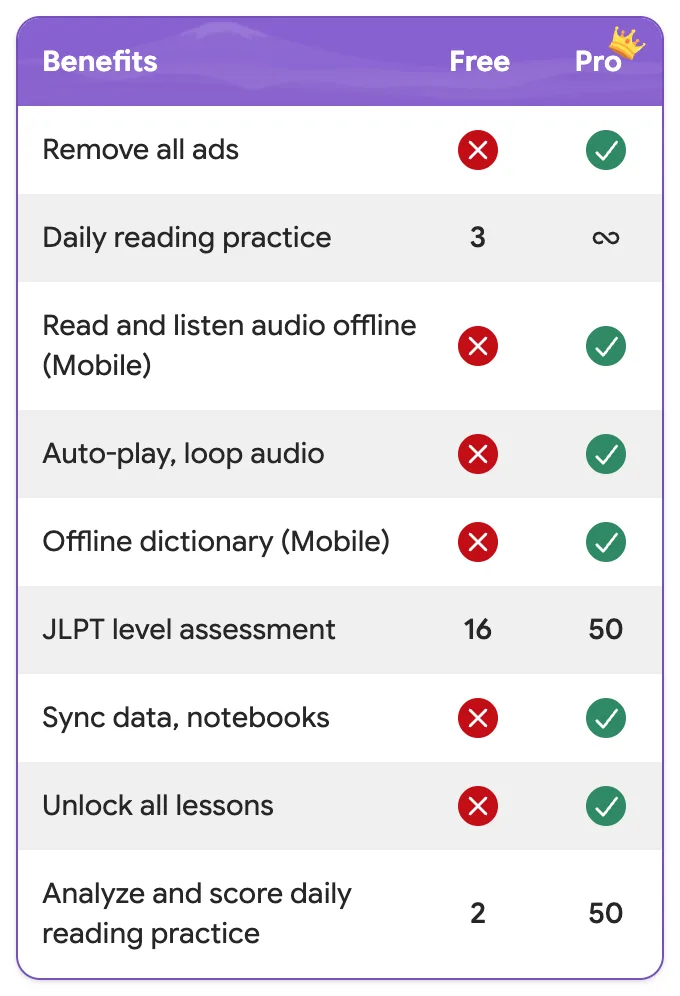
- Best for: simplified news in a native phone app, with JLPT mock tests.
- Not built for: reading free without ads, or bringing your own texts.
- Free: with ads, and 3 "daily reading practice" a day.
- Price: $48 a year or $65.99 lifetime (US web prices).
- Audio: generated speech on the web reader.
- Review: flashcards and notebooks, multiple choice or flip.
- Works on: web, iPhone, Android.
For the news at your level without paying, Yomimaru's public news pages carry each article at N4, N3 and N1, with a lookup on every word and no account needed.
NHK News Web Easy: NHK's own news in plain Japanese
NHK News Web Easy (NHKやさしいことばニュース) is NHK's free news site in plain Japanese, written for foreigners living in Japan and for children. It posts about four articles each weekday, around 8 p.m. Japan time, with furigana on every kanji, and every article has a recording that sounded to us like a human announcer (NHK doesn't say how it is made).
Each story comes in one version, so there is no level to move up or down to. We found no dictionary pop-ups on the article we checked, and no way to save a word. Its controls are only in Japanese: the buttons read ニュースを聞く ("listen to the news") and 漢字の読み方を消す ("hide the kanji readings"). Reading from outside Japan takes one click through a "For Users Abroad" notice. From inside Japan, a terms screen comes first, and it cites the reception fee households in Japan pay NHK. There is no official app.
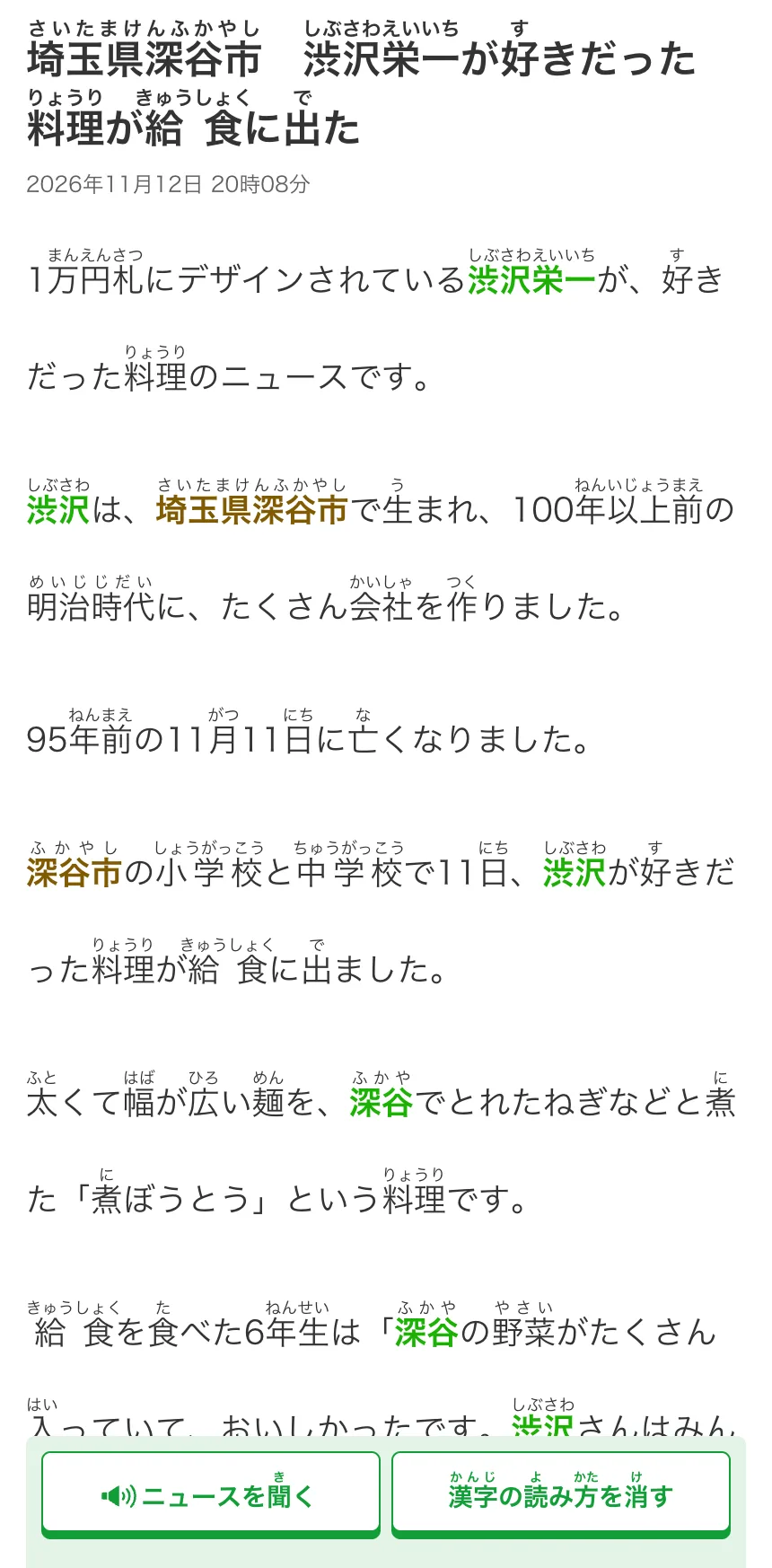
- Best for: NHK's own reporting in plain Japanese, with a recording of each article.
- Not built for: reading above or below its one level, or looking words up.
- Free: every article.
- Price: free (from Japan, a terms screen cites NHK's reception fee).
- Audio: a recording of every article.
- Review: none.
- Works on: web only.
Yomimaru's news gives each article at N4, N3 and N1, and you can tap any word in it. More graded news sites are in our guide to reading beyond NHK Easy.
LingQ: lessons from what you already watch
LingQ is built around importing. It turns Netflix, YouTube, podcasts, ebooks and web articles into lessons (its App Store listing), and its own Japanese library has audio lessons with transcripts.
It is one tool for more than 40 languages, and its Japanese page says nothing about furigana, kanji or word splitting. The free plan saves 20 words or phrases in total and makes 5 imported lessons. Full sentence translations, statistics, challenges and offline access are Premium; AI voices and "Advanced Lynx Chat" are Premium Plus. Reviews follow a fixed ladder (one day, three days, a week, two weeks, a month, then three months, in its 2023 help article), and every review mode we tried was multiple choice or a flip card. It exports your saved words as an Anki file. On the US App Store, Premium is $14.99 a month or $119.99 a year, and Premium Plus $29.99 a month or $269.99 a year.
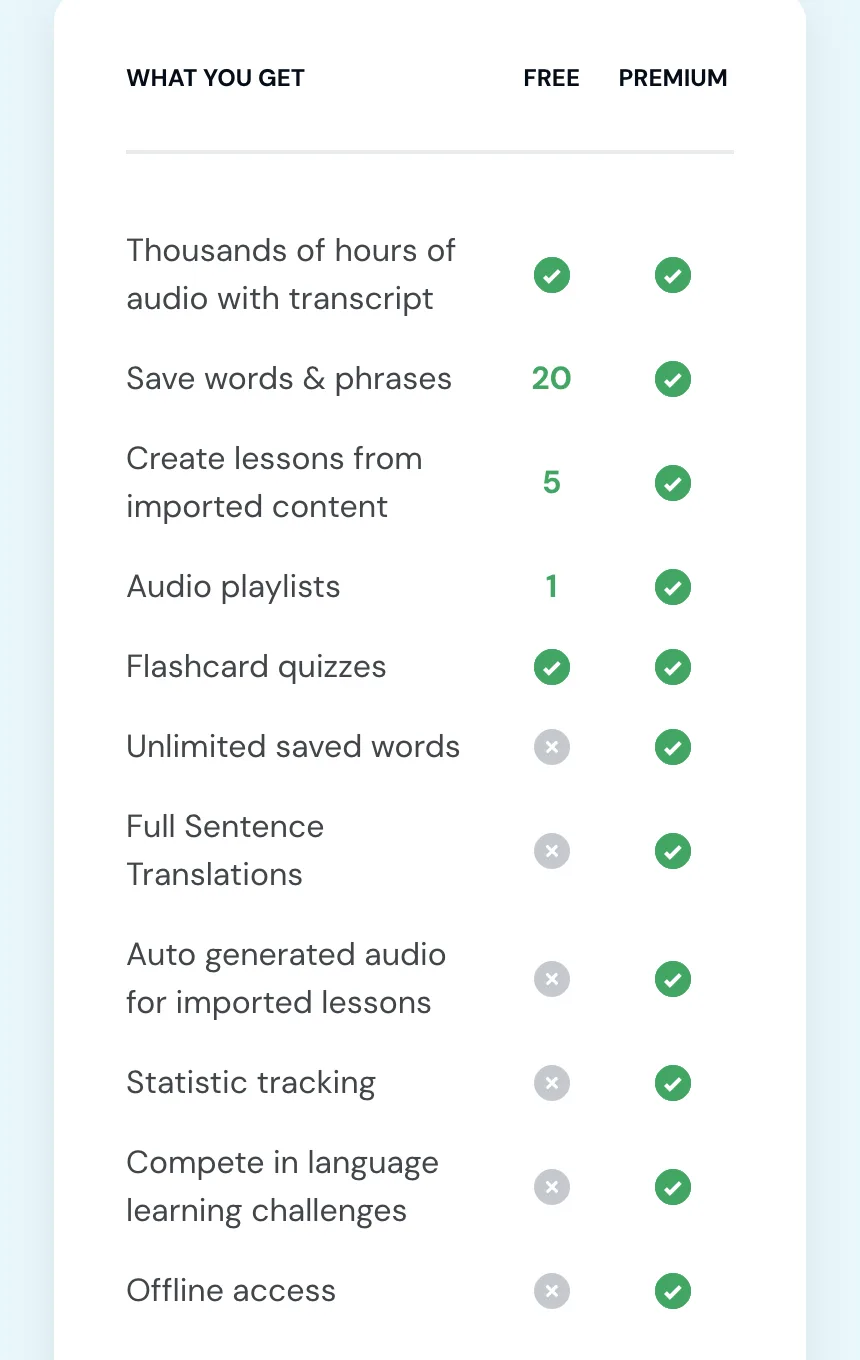
- Best for: turning shows, videos, podcasts and ebooks into lessons.
- Not built for: studying on the free plan, or typed review.
- Free: 20 saved words in total, 5 imported lessons.
- Price: Premium $14.99 a month or $119.99 a year.
- Audio: audio with its library lessons; generated audio on imported lessons with Premium.
- Review: a fixed review ladder, multiple choice or flip cards.
- Works on: web, iPhone, Android, and an importer extension for browsers.
Yomimaru is built for Japanese alone, with furigana and a lookup on every word, and the words you star go into a review where you can type your answers.
Migaku: words from the shows you watch
Migaku is a paid Chrome extension and phone app that adds Japanese lookups to Netflix, YouTube, Disney+ and a few other sites. A word you look up plays a recording, and a word you mine becomes a card with a snippet of the show's audio. It has a pitch-accent trainer for Japanese, and its phone apps take YouTube, pasted text and photos of text.
There is no free plan. On its pricing page it costs $10 a month or $96 a year, and lifetime lists at $499; on 13 November a welcome offer with a countdown cut lifetime to $290, but $499 is the standing price. It offers a 10-day money-back guarantee instead of a free tier. We found no graded texts: its beginner course covers N5 and N4 grammar, and it says it is "not optimized around" the JLPT. Its cards are flip and grade, with no typed answers. It converts Anki decks into its own card types, and sends cards to desktop Anki through its own add-on.
- Best for: mining words from Japanese shows in desktop Chrome.
- Not built for: trying before you pay, or graded reading.
- Free: none (a 10-day money-back guarantee).
- Price: $10 a month, $96 a year, $499 lifetime list price.
- Audio: word recordings in lookups; generated speech or the show's clip on cards.
- Review: flip and grade yourself.
- Works on: a Chrome extension on desktop, iPhone, Android.
For graded texts from your first kana up, with your Anki decks arriving with their review history, Yomimaru does it, and you can try it free for 14 days with no card. We weigh it against other tools in our look at Migaku's alternatives.
Yomitan: a pop-up dictionary for any web page
Yomitan is free and open source, and once it is set up it puts a dictionary pop-up on any Japanese text in your browser. Its Chrome Web Store listing counts 100,000 users.
It does nothing until you install dictionaries (its getting-started guide). To get from installing it to making a card:
- Install the extension in Chrome, Firefox or Edge.
- Install at least one dictionary, such as Jitendex or JMdict: download it and import it in Yomitan's settings, or install the recommended ones from there.
- For cards, install Anki on your computer and its AnkiConnect add-on (its Anki guide).
- Keep Anki running whenever you want to add a card.
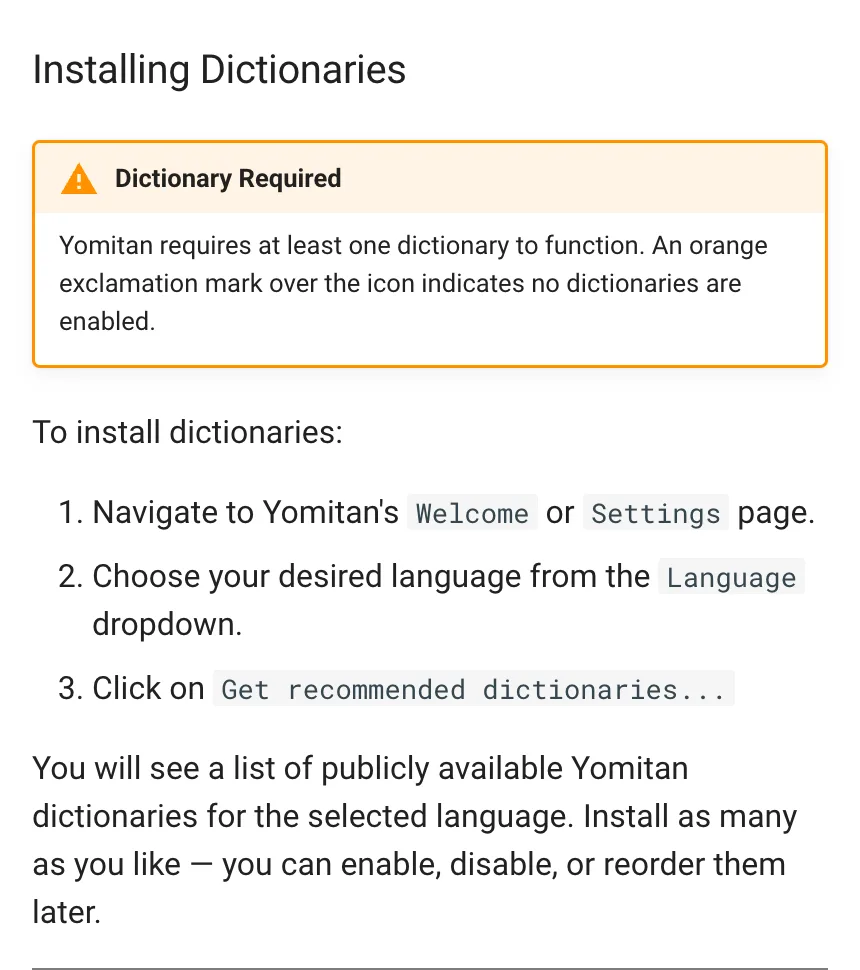
On phones it works only on Android, through Firefox, Edge or Elixir; Chrome for mobile and the iPhone aren't supported. It brings no texts, levels or review of its own, and its audio is word audio from sources such as JapanesePod101 and Jisho.org.
- Best for: lookups on any web page on a computer, with your cards in Anki.
- Not built for: iPhones, or finding something to read.
- Free: the whole extension, which is open source.
- Price: free.
- Audio: word audio only.
- Review: none of its own; it sends cards to Anki.
- Works on: Chrome, Firefox and Edge on a computer; Android through Firefox, Edge or Elixir.
Yomimaru runs in your phone's browser and installs to the home screen, and it brings the texts, the levels and the review with it.
Which should you pick?
- Choose Yomimaru if:
- you are starting from zero: begin on Yomikana, the free kana course inside Yomimaru, with no account, then read your first story;
- you want graded reading from Beginner to N1, with every word one tap away;
- you already study in Anki, WaniKani, MaruMori or Renshuu and want the reader to know those words from the first page;
- you want to type your review answers, or to ask Tomo about the sentence that stopped you.
- Choose Satori Reader if you read at an intermediate level and want every episode performed by voice actors.
- Choose LingQ if most of what you want to read or hear is on Netflix, YouTube or in podcasts, and you plan to pay for Premium.
- Choose Migaku if you watch Japanese shows in desktop Chrome and want to mine words from them, or you want a pitch-accent trainer.
- Choose Todaii if you want a native phone app with JLPT mock tests, and ads don't bother you.
- Choose NHK News Web Easy if you want NHK's own reporting with a recording of each article.
- Choose Yomitan if you read native Japanese on web pages on a computer and keep your cards in Anki.
Whichever app you pick, our guide on when to leave graded readers for native Japanese helps you choose material at your level.
For the rest of your Japanese, from first courses to kanji and flashcards, see our comparison of the best apps to learn Japanese.